HakkerBlog
Tag: lemur
-
Uboat Game - Devlog 2
For this devlog, I simply want to share how I build my UI, since Lemur, the UI library I use, can be a bit tricky.
First of all, I recommend creating a sketch. I like to use excalidraw, but you can use whatever you want.
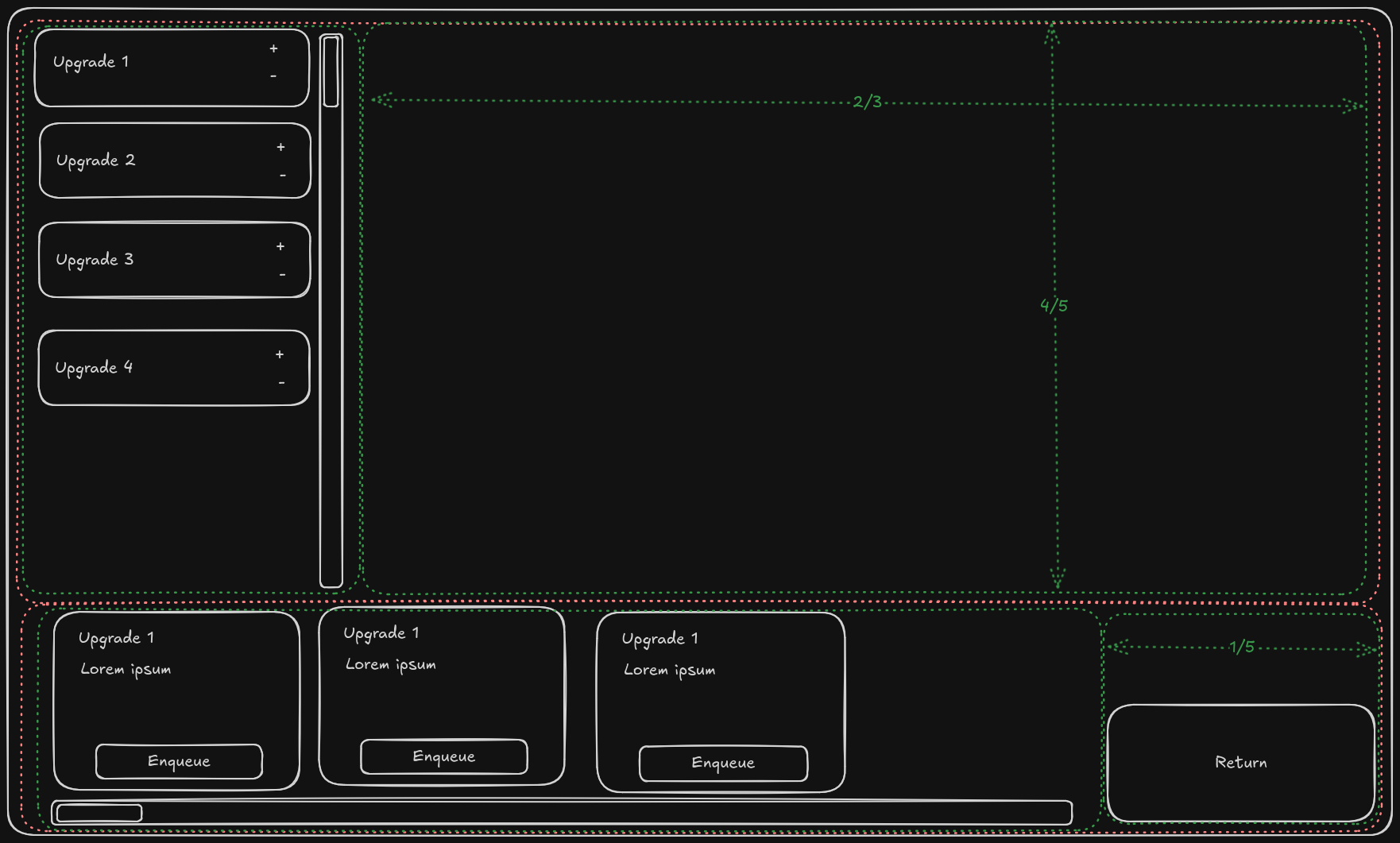
When you have that setup, you can start to build your UI. Of course start with the official documentation, but if you want you can probably just follow my example. Here is how I setup my (prototype!) UI, though without any of the scrollable elements:
    //Note that I use some custom helper classes, like FillerContainer.
    //You should manage without them however

    void createContainer(Application app){
        //Create the initial container
        //Give the first object on the y-axis all the excess space (i.e. the upper panel)
        guiRootNode = new Container(new SpringGridLayout(Axis.X, Axis.Y,FillMode.Even, FillMode.First));

        //Create both containers
        //The upper panel only has items on the x axis.
        //Give the last container the excess space (i.e. the filler)
        Container upperPanel = guiRootNode.addChild(
            new Container(
                new SpringGridLayout(
                    Axis.X,//Main axis
                    Axis.Y,//Secondary axis
                    FillMode.Last,//Main axis Fillmode
                    FillMode.Even //Secondary axis Fillmode
                )
            ),
            0, //Main direciton (X) position
            0  //Secondary direciton (Y) position
        );
        //Since the lower panel generally has items on the x-axis
        //Give the first container the excess space on that axis (i.e. the enqueue able upgrades)
        Container lowerPanel = guiRootNode.addChild(
            new Container(
                new SpringGridLayout(
                    Axis.X,//Main axis
                    Axis.Y,//Secondary axis
                    FillMode.First,//Main axis Fillmode
                    FillMode.Even  //Secondary axis Fillmode
                )
            ),
            1, //X position
            0  //Y position
        );

        // Add the queue panel
        queuePanel = upperPanel.addChild(
            new Container(new SpringGridLayout(Axis.Y,Axis.X,FillMode.Last,FillMode.Even)),
            0,//X position 0
            0 //Y position 0
            );
        //Set its preferred size to 1/3 x 4/5
        queuePanel.setPreferredSize(
            new Vector3f(
                //app.getCamera().getWidth()/getHeight() are reliable to get the window size
                app.getCamera().getWidth() / 3f,
                app.getCamera().getHeight() / 5f * 4f,
                1f
            )
        );
        //Create upper filler as 2/3 x 4/5
        Container upperPanelFiller = upperPanel.addChild(
            new FillerContainer(
                app.getCamera().getWidth() / 3f * 2f,
                app.getCamera().getHeight() / 5f * 4f
                ),
            1, //X position
            0  //Y position
        );

        //Add the available upgrades panel, it will be given excess
        Container availablePanel = lowerPanel.addChild(new Container(new SpringGridLayout()), 0,0);

        // And finally add the Return button
        bottomRightButton = lowerPanel.addChild(new Button("Return to Port"), 1, 0);
        bottomRightButton.addClickCommands(source -> returnToDock());
        bottomRightButton.setPreferredSize(new Vector3f(new Vector3f(300, 200 , 50)));

        //Setup the enqueued objects
        setupQueue();

        // Position elements (Moves and sizes guiRootNode)
        positionElements(app);
    }

    void setupQueue(){
        for(Map.Entry<Upgrades, UpgradeFlags> e : GameStatus.upgradeState.upgradeFlagsMap.entrySet()){
            if(e.getValue().isEnqueued()) {
                queuePanel.addChild(QueueField.getQueueField(e.getKey()));
            }
        }
        //Add final filler so enqueued objects are forced into correct size.
        //(Not user if this is the correct way to do this, but it works)
        queuePanel.addChild(new FillerContainer(0, 0));
    }
And here is the result:
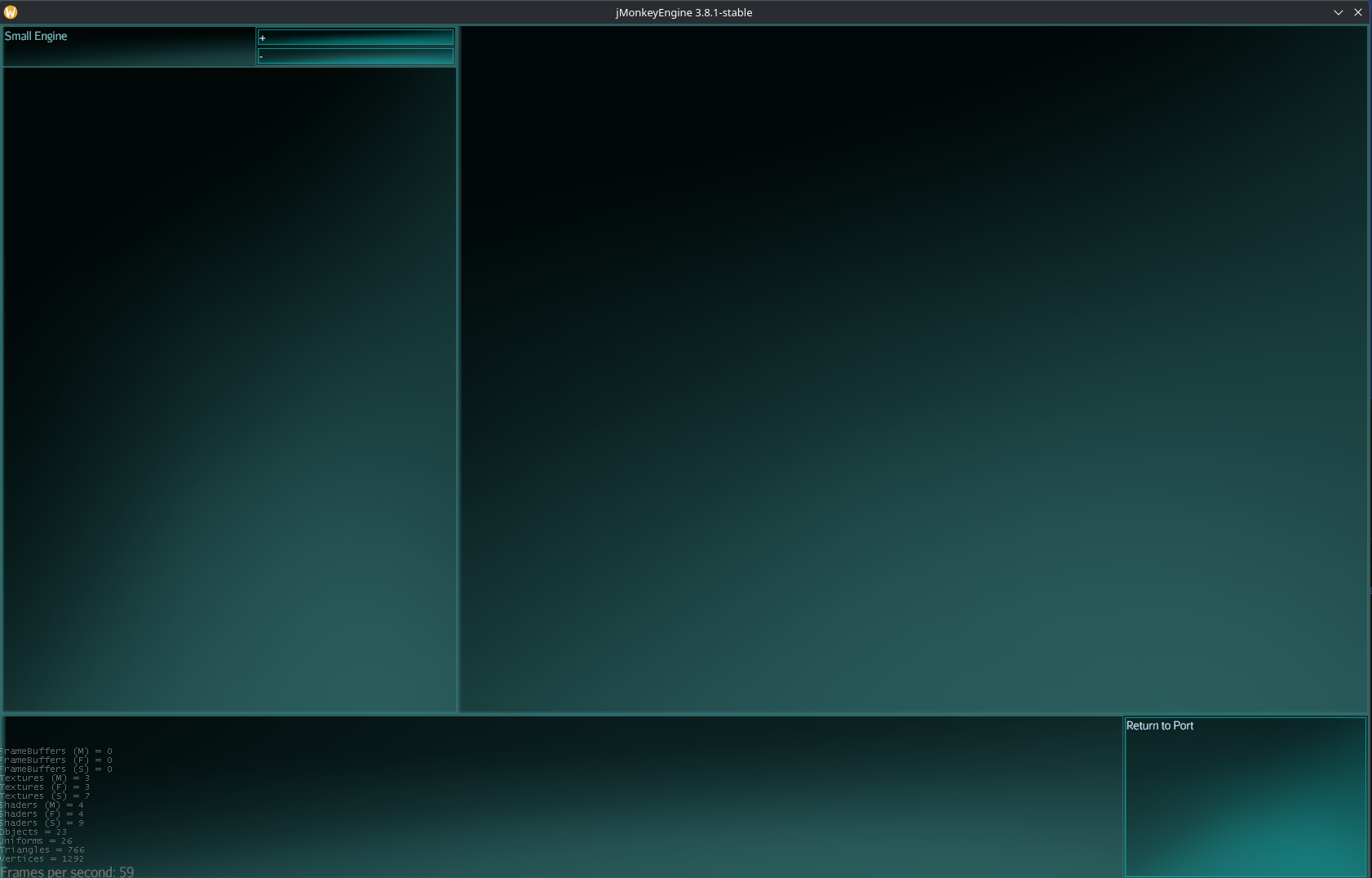
I haven't touched the styling yet, the game won't have this sci-fi aesthetic, it is simply the base style for Lemur. However, since everything sizes quite dynamically, I don't need to worry too much about that yet. When the time comes, the style will change, but it should just work, perhaps with a bit of resizing of the fillers.
09-03-2026