HakkerBlog
Tag: gamedev
-
You Should Try A Framework That Doesn't Hold Your Hand
A many aspiring game devs fetch the latest version of Unity, and get a surge of motivation when they manage to instantiate their first cube. Henceforth follows multiple hours of failing at creating a car using the inbuilt physics engine and rigidbody system. The Unity application lays dormant...
If you identify yourself in that paragraph, I implore you to try a more minimalist framework. I was hesitant to try them, since I was scared that it would be even harder than using the more complete engines, or at the very least more work. It wasn't before I was assigned to create any project for a university course.
While browsing the previous years projects, looking for inspiration, I found a game made in SFML in C++. Having tinkered a bit with C++ in a previous course, I thought that would be interesting, and boy did it change my view on the usage of frameworks and libraries.
I was under the impression that larger and more complete frameworks gave you a boost in the early stages of a project, with ready made systems and components that could be used to prototype and iterate on. This would then come at the cost of vendor lockin and lack of flexibility at the later stages of development.
While in theory this may not be false, in practice you will achieve a lot higher velocity in a lighter and more minimalist framework. The way I see it now is that larger game engines are better for larger projects, usually with multiple contributors. It's with these preconditions where a larger framework will assist you in the long run.
If you are making something yourself however, you will probably save time (and motivation) that would be used to tinker with and read up on how to use the engine. Instead you can use that time to just implement it yourself.
Let's use an example
We want to create a top down racing game, original I know (I you want to get started with gamedev, but haven't made anything yet, I heavily recommend starting with a top down racer. It is easy to implement a MVP, while still having a lot of room to iterate). Here are the steps for a initial MVP:
- Display a sprite of a car. As long as you are using some sort of framework, this should be trivial.
- Make it positional: Add a X any Y variable for its position, add (or use the already existing) a game loop and update the sprites position every tick.
- Movement: Add a velocity variable, and move the cars X and Y position in relation to the cars rotation (oh yeah, you probably need a rotation variable). Here you'll need some math that might look scary or complicated, I would recommend using some LLM to explain to you how to do it, it isnt hopelessly complicated, trust me.
- Input: When holding up, increment speed up, when holding down, increment speed down. Preferably this should be tied to the frametime but that is up to you. Also, update rotation based on input.
Done. You now have a MVP of a top down racing game. Now comes all the things where you might think you want a game engine for, but actually you don't. A good place to start is to add momentum, you might think you need some physics simulation, but you really don't. There are many ways to achieve this, but to start with, I would add another rotation variable, to seperate the cars physical and movement direction. Every tick the car moves in its movement direction, but the movement direction tends towards the cars physical direction.
You get the idea, you can achieve a lot with small and concise solutions, rather than monolithic systems. To continue, you probably want to add a max speed, or atleast limit acceleration in relation to current speed. Another feature is to add debris in the form of sprites that eventually despawn. You also want to scale the rate that movement direction follows physical direction based on current speed (higher speed -> slower movement turning).
The reason I provided this example is to show you how approchable a basic game flow really is, and while you can implement this in a large framework, you won't be using any of the built in features that signify these frameworks, hence you don't even need to use said framework. Go ahead, take the plunge, it really isnt that deep.
Here is the frameworks that I personally recommend:
- SFML, A lightweight 2d tool in C++
- JMonkeyEngine, A smaller, mature 3d game engine written in Java.
Also, if it isn't obvious, this applies to all software sectors, not just gamedev. The fastest site to build is a raw HTML page. The easiest API to build is probably a PHP script alongside a SQLite file.
31-03-2026 -
Uboat Game - Devlog 2
For this devlog, I simply want to share how I build my UI, since Lemur, the UI library I use, can be a bit tricky.
First of all, I recommend creating a sketch. I like to use excalidraw, but you can use whatever you want.
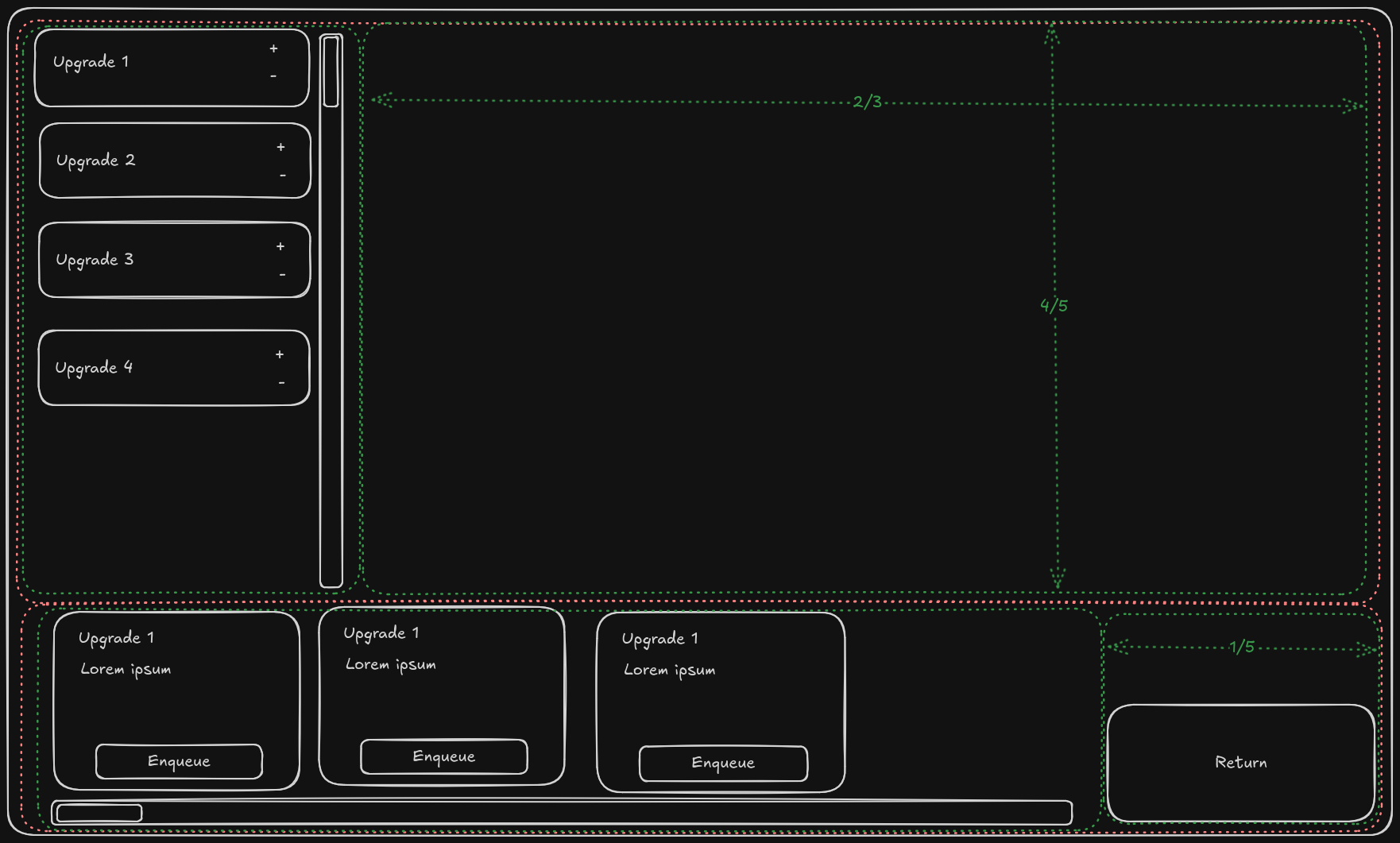
When you have that setup, you can start to build your UI. Of course start with the official documentation, but if you want you can probably just follow my example. Here is how I setup my (prototype!) UI, though without any of the scrollable elements:
    //Note that I use some custom helper classes, like FillerContainer.
    //You should manage without them however

    void createContainer(Application app){
        //Create the initial container
        //Give the first object on the y-axis all the excess space (i.e. the upper panel)
        guiRootNode = new Container(new SpringGridLayout(Axis.X, Axis.Y,FillMode.Even, FillMode.First));

        //Create both containers
        //The upper panel only has items on the x axis.
        //Give the last container the excess space (i.e. the filler)
        Container upperPanel = guiRootNode.addChild(
            new Container(
                new SpringGridLayout(
                    Axis.X,//Main axis
                    Axis.Y,//Secondary axis
                    FillMode.Last,//Main axis Fillmode
                    FillMode.Even //Secondary axis Fillmode
                )
            ),
            0, //Main direciton (X) position
            0  //Secondary direciton (Y) position
        );
        //Since the lower panel generally has items on the x-axis
        //Give the first container the excess space on that axis (i.e. the enqueue able upgrades)
        Container lowerPanel = guiRootNode.addChild(
            new Container(
                new SpringGridLayout(
                    Axis.X,//Main axis
                    Axis.Y,//Secondary axis
                    FillMode.First,//Main axis Fillmode
                    FillMode.Even  //Secondary axis Fillmode
                )
            ),
            1, //X position
            0  //Y position
        );

        // Add the queue panel
        queuePanel = upperPanel.addChild(
            new Container(new SpringGridLayout(Axis.Y,Axis.X,FillMode.Last,FillMode.Even)),
            0,//X position 0
            0 //Y position 0
            );
        //Set its preferred size to 1/3 x 4/5
        queuePanel.setPreferredSize(
            new Vector3f(
                //app.getCamera().getWidth()/getHeight() are reliable to get the window size
                app.getCamera().getWidth() / 3f,
                app.getCamera().getHeight() / 5f * 4f,
                1f
            )
        );
        //Create upper filler as 2/3 x 4/5
        Container upperPanelFiller = upperPanel.addChild(
            new FillerContainer(
                app.getCamera().getWidth() / 3f * 2f,
                app.getCamera().getHeight() / 5f * 4f
                ),
            1, //X position
            0  //Y position
        );

        //Add the available upgrades panel, it will be given excess
        Container availablePanel = lowerPanel.addChild(new Container(new SpringGridLayout()), 0,0);

        // And finally add the Return button
        bottomRightButton = lowerPanel.addChild(new Button("Return to Port"), 1, 0);
        bottomRightButton.addClickCommands(source -> returnToDock());
        bottomRightButton.setPreferredSize(new Vector3f(new Vector3f(300, 200 , 50)));

        //Setup the enqueued objects
        setupQueue();

        // Position elements (Moves and sizes guiRootNode)
        positionElements(app);
    }

    void setupQueue(){
        for(Map.Entry<Upgrades, UpgradeFlags> e : GameStatus.upgradeState.upgradeFlagsMap.entrySet()){
            if(e.getValue().isEnqueued()) {
                queuePanel.addChild(QueueField.getQueueField(e.getKey()));
            }
        }
        //Add final filler so enqueued objects are forced into correct size.
        //(Not user if this is the correct way to do this, but it works)
        queuePanel.addChild(new FillerContainer(0, 0));
    }
And here is the result:
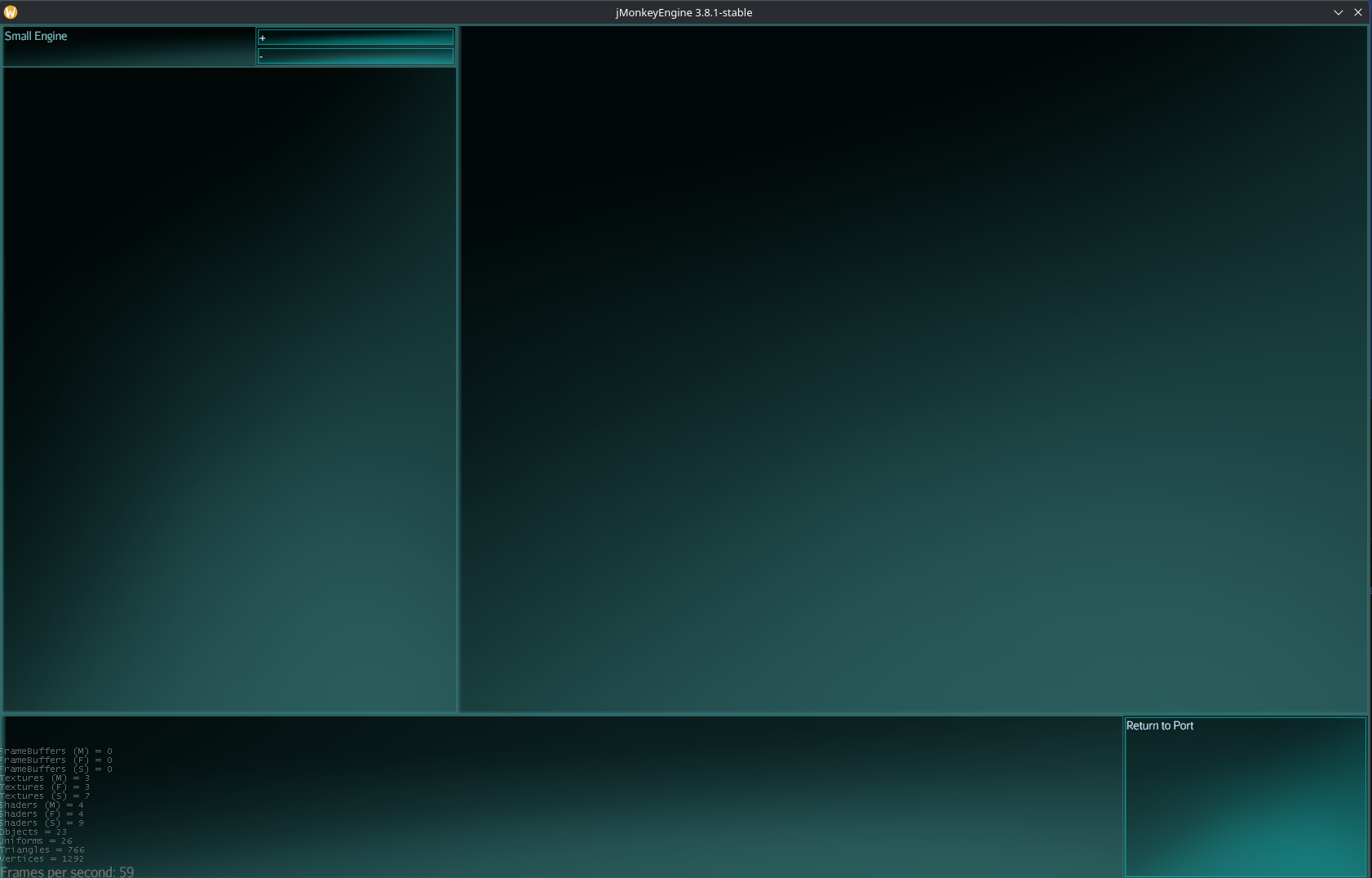
I haven't touched the styling yet, the game won't have this sci-fi aesthetic, it is simply the base style for Lemur. However, since everything sizes quite dynamically, I don't need to worry too much about that yet. When the time comes, the style will change, but it should just work, perhaps with a bit of resizing of the fillers.
09-03-2026 -
Uboat Game - Devlog 1
I have been making a game about being a uboat "captain" for a couple of months now. It has been very on and of, so don't expect actual "months" of work.
The Story
Your character is a native of a small island chain that God forgot. It is a colony of The Crown Dominion (read Great Britain), however this is mostly just in name. The capital has mostly forgotten that these islands exists, and their only presence takes the form of the local Governor and his small cabinet. Lucky for you and the island, they mostly consider their position a early retirement, considering the island a vacation resort.
Being this tiny forgotten island is the Pacific, the island is quite poor. This doesn't bother most people, living the same lives as their forefathers as fishers and traders. There is a strong makeshift culture, with yearly events where teens and young adults race their makeshift vessels made mostly of scraps. The locals are thrifty and local shippers often remark on their weird contraptions.
But oh no! A world war erupts against The Crown Dominion (thats you!) and The Imperial Union (read Germany). However, luckily most people have forgotten abouth this island, it isn't even on most maps, so you are safe from invasion for now. Eager to prove yourself in the eyes of the governor and the world, you aim to make a name for yourself with your new invention, The submarine.
However, most of what you have access to is scraps and random bits and bobs... Your first prototype is no more than a metal barrel, with a handcrank for movement and a rudder for turning. You haven't even gotten to the submersible part yet. No worries though, this craft can still handle scouting, and basically everyone has forgotten that this is a Dominion island, you can get quite close before arousing suspision.
Upgrades
Luckily, your best friend is a engineer, and given some time he'll get around to adding uppgrades. Progression is based on axis, reputation and time. You gain reputation by helping the war effort by scouting, mining, sinking, doing submarine stuff. Reputation allows you to discover new upgrades. However to unlock upgrades, you need to spend time on patrol, first after they have been unlocked may you install it.
This system (should) work well, since it rewards skilled players with higher end upgrades faster, and for beginners who play more slowly and carefully are able to unlock more Quality of Life upgrades. Basically all functions on your submarine take a lot of maintenance and baby sitting, or are just janky. But most of them can be aleviated with upgrades. Take for example your trusty handcrank and rudder, they are obviously mounted at the rear of your submarine, furthest away from the only window... However in the future, you can unlock a helm so you can controll from a better position.
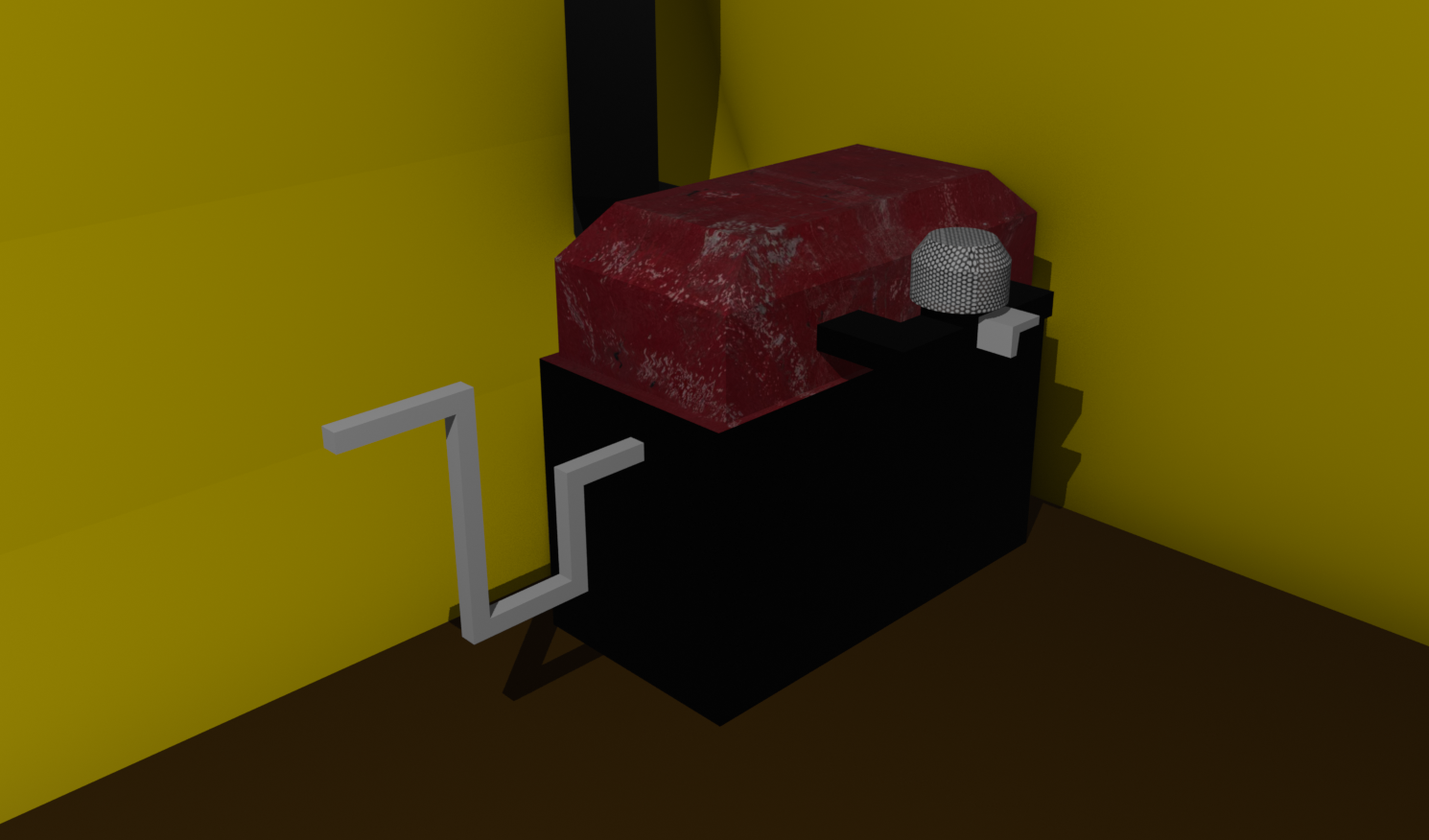
Now, to make this an actual devlog and not a concept log, let me present the first unlockable upgrade (yet atleast). The small engine! Now you don't have electricity and such, so you'll be hand cranking this one as well. Also you don't have a helm or anything yet, so to accelerate more than idle you will have to fiddle with the carborator. That totally won't be stressful in a encounter...
And here is a image of it
11-02-2026